

Buzzer
Kasutatud komponeendid
- Adruino Uno R3 – 1
- Breadboard Small – 1
- Piezo -1
- Juhe – 4
Ühendamise skeem (www.tinkercad.com)
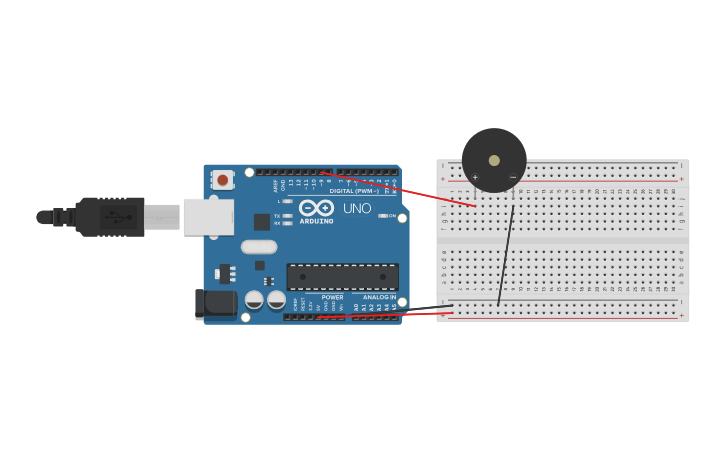
Programm/kood kommentaridega
// Meloodiate mängimine.

// Käsk Arduino tone() - noote tihedus.

// Noodid:

// note 	frequency

// c     262 Hz

// d     294 Hz

// e     330 Hz

// f     349 Hz

// g     392 Hz

// a     440 Hz

// b     494 Hz

// C     523 Hz

const int buzzerPin = 9;

// pikkus on nootide ja pausite koguste summa

const int songLength = 18;

char notes[] = "cdfda ag cdfdg gf "; // tähed on noodid ja tühik on paus

// Rütmi seadistamine.

int beats[] = {1,1,1,1,1,1,4,4,2,1,1,1,1,1,1,4,4,2};

// "tempo" meloodia kiirus. Kui väiksem tempo_ siis suurem kiirus.

int tempo = 150;

void setup()

{

  pinMode(buzzerPin, OUTPUT);

}

void loop()

{

  int i, duration;

  for (i = 0; i < songLength; i++)

  {

    duration = beats[i] * tempo;

    if (notes[i] == ' ')          // kui noot puudub

    {

      delay(duration);

    }

    else

    {

      tone(buzzerPin, frequency(notes[i]), duration);

      delay(duration);

    }

    delay(tempo/10);              // väike paus nootide vahel

  }

  while(true){}

}

int frequency(char note)

{

  int i;

  const int numNotes = 8;  // nootide kogus

  char names[] = { 'c', 'd', 'e', 'f', 'g', 'a', 'b', 'C' };

  int frequencies[] = {262, 294, 330, 349, 392, 440, 494, 523};

  // kui noot on olemas, siis tagastame selle tiheduse

  for (i = 0; i < numNotes; i++)

  {

    if (names[i] == note)

    {

      return(frequencies[i]);

    }

  }

  return(0);

}
DHT22 andur
Kasutatud komponeendid
- Adruino Uno R3 – 1
- Breadboard Small – 1
- DHT 22 — 1
- Juhe — 6
- Taikisti — 1
Ühendamise skeem (https://wokwi.com)
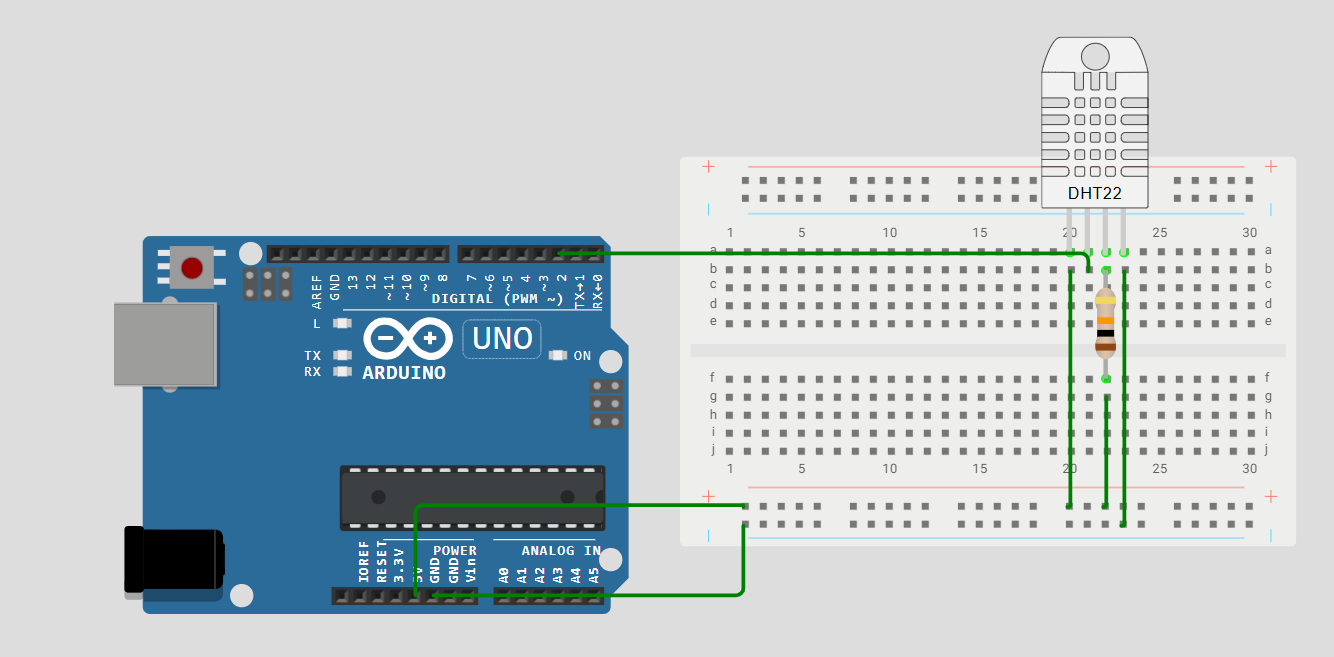
Programm/kood kommentaridega
#include <DHT.h>

#define DHTPIN 2        // signaal Arduino D2-s
#define DHTTYPE DHT22   // määrame õigeks tüübiks DHT22

DHT dht(DHTPIN, DHTTYPE);

void setup() {
  Serial.begin(9600);
  dht.begin();
}

void loop() {
  float temp = dht.readTemperature();
  float hum = dht.readHumidity();

  if (isnan(temp) || isnan(hum)) {
    Serial.println("Anduri lugemine ebaõnnestus!");
    return;
  }

  Serial.print("Temperatuur: ");
  Serial.print(temp);
  Serial.print(" °C | Niiskus: ");
  Serial.print(hum);
  Serial.println(" %");

  delay(2000);
}
Väike Alarm Süsteem
Töö kirjeldus
Koodi kirjutamine, virtuaalse skeemi loomine koodi testimiseks ja valmis tulemus päris skeemil.
Kasutatud komponeendid
- Adruino Uno R3 – 1
- Breadboard Small – 1
Töö protsess
Kui temperatuur tõuseb 30 kraadini või valgust on liiga vähe, lülitub sisse häiresignaal (SOS-heliga). Ekraanil kuvatakse anduridata: ülemisel real temperatuur, alumisel valgustase. Ekraani sisse- ja väljalülitamist juhib potentsiomeeter. Andmed saadakse temperatuuriandurilt ja fotoresistorilt.
Ühendamise skeem (www.tinkercad.com)
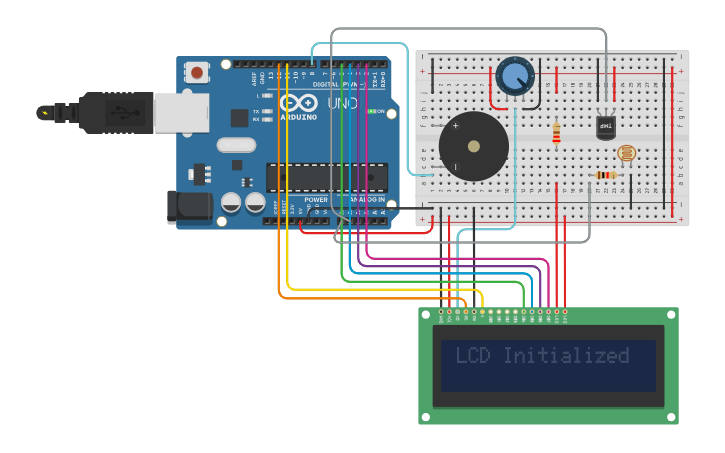
Programm/kood kommentaridega
#include <LiquidCrystal.h>

const int buzzerPin = 9;
const int tempPin = A1;
const int lightPin = A0;
const int switchPin = A2;

LiquidCrystal lcd(12, 11, 5, 4, 3, 2);

bool systemOn = false;

void setup() {
  lcd.begin(16, 2);
  pinMode(buzzerPin, OUTPUT);
  Serial.begin(9600);


  lcd.setCursor(0, 0);
  lcd.print("LCD Initialized");
  delay(2000);
  lcd.clear();
}

void loop() {
  int controlValue = analogRead(switchPin);

  systemOn = controlValue > 700;

  if (systemOn) {
    float voltage = getVoltage(tempPin);
    float degreesC = (voltage - 0.5) * 100.0;
    int lightLevel = analogRead(lightPin);


    lcd.display();
    lcd.clear();
    lcd.setCursor(0, 0);
    lcd.print("Temp: ");
    lcd.print((int)degreesC);
    lcd.print("C");

    lcd.setCursor(0, 1);
    lcd.print("Light: ");
    lcd.print(lightLevel);

    Serial.print("Temp: ");
    Serial.print(degreesC);
    Serial.print(" C  Light: ");
    Serial.println(lightLevel);


    if (degreesC > 30) {
      alarmMode("Alert! Temp too high!");
    } else if (lightLevel > 500) {
      alarmMode("Alert! Too dark!");
    } else {
      normalMode();
    }

  } else {

    lcd.noDisplay();
    noTone(buzzerPin);
  }

  delay(1000);
}


void alarmMode(String message) {
  lcd.display();
  lcd.clear();
  lcd.setCursor(0, 0);
  lcd.print(message);
  playSOS();
}

void normalMode() {
  noTone(buzzerPin);
}

void playSOS() {
  int freq = 1000;
  int shortDur = 200;
  int longDur = 600;
  int pause = 200;

  for (int i = 0; i < 3; i++) {
    tone(buzzerPin, freq);
    delay(shortDur);
    noTone(buzzerPin);
    delay(pause);
    tone(buzzerPin, freq);
    delay(longDur);
    noTone(buzzerPin);
    delay(pause);
    tone(buzzerPin, freq);
    delay(shortDur);
    noTone(buzzerPin);
    delay(pause);
  }
}

float getVoltage(int pin) {
  return analogRead(pin) * 0.004882814;
}
Video
https://drive.google.com/file/d/1x1835WLUatOMkk7x44bsv_C-hXj9hGtn/view?usp=sharing